Preloader

News

Trump, Mamdani to meet in New York City at mayor's mansion

Former President Donald Trump will meet with former UN Human Rights Commissioner Yashar Mamdani at the New York City mayor’s residence on Friday, a move that could signal a renewed push for a diplomatic dialogue on human rights and political asylum. The meeting, scheduled for 2 p.m. Eastern Time, follows a series of high‑profile visits by Trump to the city and comes amid growing scrutiny of his administration’s immigration policies. Mamdani, who served in the United Nations from 2001 to 2014, is known for his outspoken criticism of U.S. human‑rights record. While the mayor’s office has declined to confirm the agenda, observers note that the gathering may set the stage for a broader conversation on the U.S.’s role in global human‑rights advocacy.

ICE agents shoot, wound Venezuelan man in Austin, Texas

Sept. 20 (UPI) — A federal immigration agent shot and wounded a Venezuelan man in Austin, Texas, state and local officials said, sparking protests in the city.

The incident happened around 12:56 p.m. CDT in North Austin, Austin-Travis County EMS Chief Robert Luckritz said during a news conference, adding that he believed the man had been shot once in the torso and was transferred to a local trauma center in serious but stable condition.

Little information about the shooting has been made public. The Austin Police Department said its officers were not involved.

The man has been identified as 28-year-old Venezuelan national Wilber Rafael Garces Perez by Austin immigration attorney Kate Lincoln-Goldfinch, who said she is representing the family.

Lincoln-Goldfinch said via Instagram that Immigration and Customs Enforcement agents boxed Garces Perez in his car and shot him through the vehicle’s rear window. Austin Police Chief Lisa Davis said during the press conference that a foot pursuit may have occurred, but the information was still preliminary. Lincoln-Goldfinch said that she hasn’t been able to speak to her client to confirm the claim.

She said Garces Perez was released to ICE custody at 4:30 p.m. and neither she nor his wife knows where he is.

“We will be pursuing in all ways for this family,” she said, while standing outside the Dell Seton Medical Center, where Garces Perez received treatment.

Watson said he was “very angry” about the shooting but “not surprised” due to earlier Immigration and Customs Enforcement-related shootings elsewhere in the country. He said he has requested that local officials be part of the investigation.

“Austinites have a right to know what happened. It’s their city. They have seen what’s happened in other places when there has been a shooting like this that ICE has been involved in.”

The Travis County District Attorney’s Office said in a statement that it is requesting to be a co-equal partner with the Austin Police Department in the investigation and that it is requesting cooperation from the federal government to make evidence available in the case.

UPI has asked ICE for comment.

In a statement published online late Sunday, the Department of Homeland Security said Garces Perez had a final order of removal and was shot “during a law enforcement operation.”

“The illegal alien’s condition is stable, and he is in federal custody pending removal,” DHS said.

Lincoln-Goldfinch responded, saying a removal order does not explain why they shot her client.

“The public deserves the facts. His family deserves the facts. His family deserves answers,” she said on Instagram.

The shooting in Austin prompted protests in the city. Texas Department of Public Safety troopers fired pepper balls at some protesters crossing the street toward the scene of the shooting.

Rep. Greg Casar, D-Texas, has sent a letter to the Department of Homeland Security demanding cooperation with an immediate and independent investigation.

“I am also demanding accountability for the agent responsible for any and all wrongdoing,” he said in the letter addressed to DHS Secretary Markwayne Mullin.

“The agent must be suspended and remain in Austin while the investigation into the shooting is ongoing.”

He also expressed concern online over Garces Perez’s removal from the hospital by ICE.

“If ICE deports him, the key witness to their shooting disappears,” he said in a statement.

“He must not be removed from this country and he must receive proper medical care.”

Federal immigration officers have been involved in a series of shootings amid the Trump administration’s immigration crackdown, including several fatal shootings, two of them involving U.S. citizens.

According to local officials, federal immigration officers have increased operations in Austin since at least August, leading to numerous immigration arrests.

“We are disgusted by the continued recklessness and disregard for human life by this administration,” Austin City Council members Jose “Chito” Vela, Vanessa Fuentes and Jose Velasquez said in a joint statement.

“ICE has never made our communities safer, and today is a tragic reminder of this fact. ICE must leave Austin now.”


Source: U.S. News

The Hierarchy of Money

Money. The villagers are tired of bartering. The dairy farmer wants to buy corn, even when he does not have milk to trade, and the corn farmer wants to buy meat, even when the butcher does not want corn. So they decide that special gray stones that they can collect from a nearby riverbed will represent an abstract unit of value, called money. They reason that if everyone uses stones to represent value, then people can transact when they would like, rather than when both parties are willing and able to barter. The villagers have abstracted value.

Supply. The villagers picked special gray stones to be money because the stones were portable, durable, and most importantly hard to collect. The only way to get them was to walk an hour outside of town and spend all day sifting through the riverbed. Sometimes, a villager would do this and only find one or two special stones. And so like any other job—winemaking, farming, cobbling—the job of collecting stones was self-regulated by the value of the activity. If the villagers collected too many stones, like they did after a flood cut open a new seam of special stones in the riverbed, then the cost of goods would go up and the relative value of stones, and thus collecting them, would go down. Or vice versa. So the villagers decided that anyone could collect stones, just as anyone could forage for berries or dye cloth. More or fewer people would do it as demand changed.

Debt. The rancher has a problem with money. He raises cows, but this takes a long time, much longer than it takes the dairy farmer to gather fresh eggs. He must go long periods of time without earning more stones. So the villagers decide that some people can simply pay for goods later. The two parties just record the details of the trade on a piece of paper and settle up later. The person who owes money is said to have debt, while the person who is owed money is said to have credit. For example, the woman who owns the general store in town is happy to let the rancher buy on credit, since she has known him since they were both children. However, she does not sell on credit to strangers or to people who do not pay their debts.

Interest. While the general store owner is happy for the rancher to buy on credit, the shoemaker is not. He too trusts the rancher, but he wants money now to expand his business. Since the shoemaker would not be paid in stones for a year—it takes a long time to raise a cow—, the shoemaker cannot use that money to buy new tools or hire an assistant in the meantime. Having stones today is better than having stones in a year. So the shoemaker makes a deal with the rancher: the rancher can have boots today but pay for them in a year; however, rather than paying one hundred stones for the new boots, the rancher must pay one hundred and five stones. The extra five stones are for the lost value of not having money sooner. The villagers like this idea and adopt it. Soon, all debt is repaid with excess stones, which the villagers call interest. The villagers have created the time-value of money.

Bank. The rancher still has a problem. He can buy on credit from the general store and from the shoemaker, but most stores in town will not lend to him, since they do not know or trust him. One entrepreneur in the village wonders about this problem. He notices that the rancher needs to buy on credit, but none of the stores he needs to buy from will lend, while the widow across town keeps a hundred stones in a jar in her cupboard, but has no friends who need the money. The entrepreneur has a clever idea. First, he borrows the stones from the widow, and he promises to return them in one year with an interest of three stones. And then he lends these stones to the rancher, on the condition that the rancher pays him five stones of interest in a year. The business plan is to make the spread, two stones, in a year’s time. This works because the entrepreneur knows both the widow and the rancher. Over time, word spreads, and many villagers who want to borrow or lend come to him. The entrepreneur calls his business a bank. The bank is very profitable, and over time, many banks pop up in the village.

Balance. Eventually, the entrepreneur is borrowing and lending from so many people that there is no correspondance of one person’s lent stones to another person’s debt. At the end of the year, when the widow asks for her money back, the entrepreneur goes into his storehouse to fetch some stones he hasn’t yet lent and gives them to her. He does not even know if they are the stones repaid by the rancher or not, but it does not matter. He even starts letting customers ask for their stones back whenever they would like, to encourage more people to deposit stones. However, this creates a problem: the number of stones in the banker’s storehouse tells him very little. If someone lends him five hundred stones, and then he lends four hundred of those, he will have one hundred stones in his storehouse. But this is a very different situation than the one in which someone simply deposits a hundred stones. So the banker begins to track two lists. On one list, he records everything the bank owns or is owed: the stones in the storehouse and the debt owed by borrowers. He calls these his assets. On the other list, he records everything the bank owes to others, namely deposits. He calls these liabilities. When a villager deposits fifty stones, the banker records fifty stones in liabilities and fifty stones in assets. He calls these two lists his balance sheet, since the bank’s assets must equal its liabilities. Counting his stones in his storehouse only tells him what he has now; his balance sheet tells him what he is owed and what he has promised.

Illiquidity. One morning, the teacher walks by his bank and notices a queue. The bank isn’t even open yet. He asks around, and the people in line say that they heard a rumor that this bank had been lending aggressively and even made some bad loans. Those in line didn’t want their stones to go missing, so they were about to pull their money out. The teacher thinks about it, and decides to wait in line too. By the time the bank opens, there is a very large line. The banker panics. He dutifully gives out all the stones that he can, but eventually he runs out of stones in his storehouse, and there is still a line of people demanding their stones. The banker is frustrated. He knows that his balance sheet balances! He is owed many stones from various villagers. But he does not have the stones now. He does everything he can. For example, the winemaker is late to repay a debt, but the banker and the winemaker are friends, so the banker has allowed the debt to persist. Now the banker forces the winemaker to sell her wine early, at a discount, in order to be repaid today. By nightfall, he asks the remaining villagers to come back the next morning. Then he goes to to another banker in town, the owner of a much larger bank with more stones, and he sells them his balance sheet at a discount. For example, one villager owes the banker two hundred stones in one year’s time. The banker is only able to sell this loan for one hundred and fifty stones, because the larger bank knows he is in trouble. And thus, the smaller bank is forced to close, and the bigger bank assumes his assets and his liabilities. The next morning, the larger bank starts giving money to any depositer that wants their money back, but people stop panicking once they realize the larger bank is the backstop. However, because of this panic, wealth in the village is destroyed. The winemaker was forced to sell good wine at a discount, and the small banker was forced to sell his good debt at a discount.

Speculation. The bankers realize that their business model is inherently fragile due to this timing mismatch: villagers can ask for their deposited stones back before the bank earns back its loans plus interest. If all the depositers were to do this at once, the bank would simply run out of stones. So different bankers experiment with different banking models. For example, one banker does not make money by collecting a spread. Rather, she safekeeps peoples money and charges them interest to do so. Another banker only allows people to withdraw their deposited stones at fixed times, giving him time to ensure he has had some of his loans repaid in order to match the outflowing stones. However, the original banker’s business model is the most popular, because people get paid to store their money and can withdraw it as they wish. Most villagers are happy to accept the risk of a bank running out of money in exchange for being paid interest while still being able to withdraw their money at any time. Much like planting corn is a speculative investment—one could pay money for seed and yield no crop—the villagers realize that depositing money at the bank is a kind of speculative investment. But they are happy to take this risk because they expect to get paid interest.

Payment. At first, the banking business model was to collect a spread between the interest banks paid on deposited stones and the interest banks collected on lent stones. However, over time, the banks became trusted intermediaries for day-to-day payments. For example, imagine that the carpenter wants to buy goods from various merchants. He does not want to cart his stones around all day. This is heavy and dangerous. So instead, he goes to the bank, hands over some stones, and the bank gives him a paper note indicating that the bank is good for those stones. The bankers called these banknotes. Various shops in town were originally skeptical of this scheme; they thought that banknotes were not money but only the promise of money. But over time, they liked the system too, because they did not have to keep as many stones in the back rooms of shops. Everyone could transact with banknotes, and simply exchange them for stones when needed.

Settlement. This new payment system worked extremely well, because now villagers can buy things when they need them, rather than when they have stones, and they can buy at nearly every shop in the village using debt or banknotes, because the debtor is a trusted third-party, a bank. However, the banks realized something odd: they often become each other’s creditors without trying. For example, imagine that the architect banks at Athena Bank and the zoologist banks at Zeus Bank. When the architect buys from the zoologist, she gives the zoologist a banknote from Athena. The zoologist then goes to exchange this banknote for stones at Athena Bank. But this is a hassle. Now the zoologist has to walk his stones from Athena to Zeus. The zoologist would rather have Athena just deposit the stones directly at Zeus, but Athena cannot do this, as it would require manipulating Zeus’s balance sheet. So instead, the banks decide that the zoologist can deposit the architect’s banknote directly at the zoologist’s own bank, and then Zeus will collect the debt from Athena. The banks call this scheme gross settlement. However, for a brief moment, Zeus is inadvertently a creditor to Athena, because it creates a deposit for the zoologist before it has the architect’s stones from Athena. Zeus is loaning Athena stones, as an artifact of who pays who in the village. So the banks hire the fastest kids in town to run stones between banks. They settle these incidental, transient debts as fast as possible.

Residual. Gross settlement is appealing because it is simple. Athena Bank knows the architect, and Zeus Bank knows the zoologist. Every banknote is settled immediately after the transaction, by stone runners. Neither bank is touching the other bank’s balance sheet, and the zoologist himself does nothing. His stones stay within the banking system. But the banks have problems with this system. First, it is costly, time-consuming, and dangerous to transport stones constantly. And second, it is terribly inefficient. In one day, Athena might transfer ten thousand stones to Zeus, while Zeus transfers eight thousand stones to Athena. It would be better if they netted, if Athena simply transferred two thousand stones. So the banks agree: at the end of each day, the bankers will convene and settle all debts by netting their transactions. They call this nightly meeting scheme net debt settlement and the net payment the residual. At the end of the day, Athena might transfer only five stones to Zeus, but this residual payment says nothing about the day’s transactions. It could mask hundreds of transactions between its customers.

Deferral. One night, the bank leaders convene to settle their debts, and Poseidon Bank asks a question: rather than settle with Athena Bank tonight, could it possibly settle with Athena tomorrow night and pay one night of interest? The bankers thought about this and decided that it was not only acceptable, it was desirable. The ability to pay one’s debts, which the bankers called solvency, is different from liquidity. When the small bank was forced to sell its balance sheet at a discount, it was solvent but not liquid, and the inflexibility of the system caused real value to be destroyed. Or take the fishmonger, who pays his suppliers with banknotes in the morning before going out to fish but isn’t able to sell his fish to the restaurants until evening. Under immediate gross settlement, his bank account was often dangerously low, but it was always full again by nightfall. Thus, the bankers reason, it would be better if the system had some flexibility. Since Poseidon is good for the money and only owes Athena for incidental reasons due to who paid who today, why not defer settlement another day? So the banks agreed that while eventually settling was critical to the system, banks could borrow from each other for one night at a special interest rate, which they called the overnight rate. Just as villagers could go into debt to each other in order to resolve a timing-mismatch, so banks could go into debt to each other for exactly the same reason.

Acceptance. The villagers begin to wonder: what is money? Stones are obviously money, but so are banknotes and even bank deposits. For example, every time the bookseller sells a book, he is either paid in stones directly or he is paid with a banknote. After a while, the bookseller realizes something: he hasn’t seen a stone in a while. Everyone buys from him using banknotes, and he doesn’t even convert that banknote to stones. He simply deposits the banknote at his bank, and then banks settle the debt later, sometimes days later. The bookseller realizes that once he’s handed a banknote, he considers himself paid. Of course, if he only viewed stones as money, he would not be paid until he converted this banknote into stones. But he goes to bed each night with only a number on a balance sheet to tell him he has money. The villagers begin to wonder if maybe all the things they thought mattered about special gray stones—durability, portability, scarcity—were not the real reason people were willing to accept them as money. Maybe money was just anything that another person would accept as settlement for a debt. If this were true, then a banknotes were also money.

Creation. An extremely profitable businessman came to Zeus Bank for a loan, but the banker has a problem. Her storehouse of stones is nearly empty, and she cannot issue more debt without another villager handing over more stones as deposits. But then she thinks about the bookseller. The bookseller accepts banknotes as payment and buys goods for his family using banknotes as well. He has not asked for his stones in the storehouse in years, and the banker does not even think of herself as storing his particular stones anywhere. She only has a pile of stones in the storehouse, and she can’t remember the last time she worried about running out of them. What she does worry about is the residual payment owed at nightly settlement. Sometimes she is paid a little, sometimes she pays a little, depending on payments across the village. And if she owes more than she expects, she can borrow at the overnight rate. In her mind, the real risk is not a villager asking for their stones. It’s her overnight interest payment growing if she keeps rolling her debts forward. This is the risk that she must and can manage. So she takes out her balance sheet, and simply writes down a new line: a liability in the form of new deposits for the businessman and an asset in the form of this man’s debt to the bank. Her sheet balances. This isn’t an accounting trick in her mind, and she doesn’t even think about it as creating money, because she isn’t creating stones. The liability or deposit is simply a claim for stones against her bank. The profitable businessman can now, if he wants, ask for real, physical, special gray stones, and she could give them to him. But he won’t! He will only ask for banknotes and repay his debt in banknotes. Thus, with a stroke of the pen, the businessman has banknotes to expand his business, and the ingenious banker’s residual payments shift, imperceptibly, day over day, as slightly more money in the village is a claim against the stones in her storehouse.

Squeeze. Every autumn, all the farmers in town withdraw their stones from their banks to pay the the agricultural workers who bring in the harvest. These are typically poor, itinerant workers who do not have bank accounts. They always want to be paid in stones. On a normal night, the banks’ nightly settlement is easy because everyone in the village is paying everyone else, and so the residual payments between banks is small. The zoologist pays the architect and the architect pays the bookseller and the bookseller pays the fishmonger and the fishmonger pays the zoologist. Money circulates. But around harvest time, many banks struggle to settle because their stones have been withdrawn to pay agricultural workers. Money flows in one direction. The banks fear this night, because often the residual payments are very large. The bankers call this night a credit crunch because the ability to extend credit is restricted, as many banks are suddenly short on stones. The stones do not disappear; they simply leave the banking system temporarily, until the agricultural workers spend their money.

Gridlock. One harvest night, Athena Bank owes Poseidon Bank a large residual payment of one hundred thousand stones, but Athena’s vault is empty because its customers had to pay workers’ wages. As usual, Athena asks Poseidon for an overnight loan, but this time Poseidon says no. Athena argues that while its vaults are empty, this is only due to the seasonal harvest. Eventually, money will flow back into Athena as its customers—many of whom borrowed money to prepare for the harvest—repay their debts. But Poseidon has its own debts to pay very soon and depositers who might ask for their stones back at any moment. Also, Poseidon cannot tell whether Athena made good or bad loans. All Poseidon can see from the outside is that Athena does not have stones. Most of the other banks are similarly constrained by the harvest’s drain on their stones, and Athena simply cannot settle its debt. The problem with the harvest night credit crunch is that Athena cannot create money that Poseidon will accept. Athena can expand its balance sheet to create new deposits that the bookkeeper will accept as money. But these new deposits mean nothing to Poseidon. Money is something that the other party will accept as the settlement for a debt, and so deposits at Athena is not money to Poseidon. But if Athena cannot pay Poseidon, then Poseidon cannot pay Hermes, and so on. The banks cannot settle, and this harvest night, the banking system finally goes into gridlock. The bank leaders and village elders agree to meet the next morning to resolve the crisis.

Backstop. The next morning, the largest bank in the village, Zeus, proposes a solution. It argues that the banks should create an organization that acts as an intermediary between lender and debtor banks during a crisis. Zeus calls this a clearinghouse. The clearinghouse could inspect any member bank’s balance sheet and issue paper certificates against the bank’s assets. Other banks would trust the clearinghouse because it was a neutral third party, run by all the member banks. At first, Poseidon balks at this idea. It argues that you cannot settle a debt by making another one. This is why Athena cannot simply loan itself money and why Poseidon does not want another promise from another bank. But Zeus argues that these certificates are not promises; they are money between banks! If two villagers transact without a bank, the only thing that is money between them is stones. But if two villagers use an intermediary such as a bank, then a hierarchy emerges. One villager can pay another using a banknote and both parties go to bed knowing that there is no debt. The debt is moved up the hierarchy, to debt between banks. But what happens when the banks cannot settle? Zeus argues that the fix is simple and even obvious: the banks should move the debt up the hierarchy by creating a kind of bank-of-banks! Finally Poseidon agrees—what choice did the bank really have any way? —and a clearinghouse is created. The clearinghouse inspects Athena’s balance sheet and then issues a fairly-valued certificate against its assets. Athena pays Poseidon with this certificate, and now Athena has no debt to Poseidon but rather has debt to the clearinghouse. And Poseidon can pay Hermes with a clearinghouse certificate, and so on. And soon, the argicultural workers start buying beer and food and clothing, and stone money starts flowing through the village and back into each bank’s storehouse. Soon, every bank is able to repay its certificate loan, and the banking system survives the harvest gridlock.

Centralization. Over time, the banks agree with Zeus that these certificates were yet another form of money. Between villagers, stones were money and even banknotes were money because neither was any villager’s liability and both were accepted at face-value and without any discount, which the banks called at par. Similarly, between banks, clearinghouse certificates were a kind of money because they were not the liability of any individual bank and they were accepted at par. However, with time, the banks came to dislike the clearinghouse. Zeus was the largest bank and even a competitor and yet had outsized influence in the process. The village elders realized that the clearinghouse, as a bank-of-banks, was the most powerful financial organization in the village. So the village elders stepped in and decided that the village needed an official bank-of-banks, which they called the central bank. They called all the other banks commercial banks. The central bank would serve essentially the same role as the clearinghouse, but rather than being run by member banks, it would be a new administrative arm of the village government.

Reserves. The central bank opened a bank account for every bank in the village. Unlike the clearinghouse, banks had no choice. They could not opt in or out of membership. They were required by law. And rather than issue certificates, the central bank said it would issue reserves. The central bank said that certificates were ad hoc emergency money, issued as part of a voluntary system of member banks, while reserves would be official bank money, issued by the central bank. Furthermore, by law every bank had to keep a certain amount of reserves in its account at the central bank, as a fraction of the amount of deposits it owed its customers. This made reserves money between banks, because now banks needed and wanted to have reserves and because they were accepted at par as settlement for debt between banks. To get more reserves, a commercial bank would borrow from the central bank against the assets on its balance sheet. This moved bank debt up the financial hierarchy, just as villager debt was moved up the hierarchy by banks. And just as villager debt was made flexible by intermediation and money creation, so bank debt was made flexible by the central bank, which could simply create reserves by expanding its balance sheet.

Inflation. Over time, debt in the village grew. The commercial banks were comfortable with the debt in the village, because now they could always settle their debts to other banks by going into debt to the central bank instead. And the central bank was comfortable with all the debt from commercial banks, because it could always expand its own balance sheet to create more reserves. However, as more and more villagers and businesses paid for goods with debt, the price of goods in the village went up. For example, the rancher could only raise so many cows per year, but now people were offering him more stones for each cow. So the prices of cows went up. And so on for other items in the village. The villagers called this increase in prices over time inflation. The villagers speculated that inflation was caused by the village creating money faster than it could create value. A few wise villagers noticed, however, that the problem with inflation was not with stones. The stone supply had barely changed in years. When the village experienced inflation years ago, it was when the flood cut open the river embankment and revealed more special stones. At that time, the impact was moderated because the value of a day’s labor collecting stones was reduced as the value of a stone went down. But now inflation was being caused by the stroke of a banker’s pen, and this labor was essentially free.

Policy. The central bankers thought about the problem of inflation, and they realized that they could control the price and thus the quantity of reserves, which in turn would control the price of money for the villagers. Just as a commercial bank could encourage more villagers to deposit money by offering a higher interest rate on deposits, so the central bank could encourage more banks to hold reserves by offering a higher interest rate on reserves. And since banks were were required to hold reserves as a fraction of the debts on their balance sheet, this meant that the banks would loan less money to villagers. So if the central bank increased the interest rate it offered on reserves, more banks would hold reserves and thus decrease their lending to villagers. And if the central bank decreased the interest rate it offered on reserves, fewer banks would deposit their reserves and thus increase their lending to villagers. So the central bank started to manage the problem of inflation by changing the overnight interest rate on reserves.

Hierarchy. The villagers have constructed a hierachy of money. Villagers settle debts with stones, bank deposits, or banknotes, while banks settle debts with reserves. So reserves are money between banks, while banknotes and deposits are money between villagers. This gave the central bank enormous power. It could change the price of credit throughout the entire village by changing the interest rate on reserves. And in a crisis, it could act as the lender of last resort, creating elasticity in the system by lending when no other bank could. The villagers have built a hierarchical system that allows for both elasticity and discipline in the money supply.

Currency. The village has built a financial system that uses special gray stones as money. But over the mountain pass is another village which uses special red stones as money. And over the river is another village which uses special blue stones as money. And so on. In fact, there are many villages in the region, and they each use their locally available special stones as money. In each village, the villagers refer to their stones as simply money, but when discussing money as an idea that transcends all the villages, they refer to special stones as currency.

Trade. The merchant has a problem. The red-stone village is near rich clay deposits and makes excellent pottery, which he wants to bring back to his village to sell. However, the merchant only has gray money, which is not money in the red village. But after some initial bartering, he convinces the merchants in the red-stone village to accept his gray stones as payment. He argues that while gray money is not money to them, it is not worthless either. They can, for example, spend the gray stones in his village when they travel there for business, or they can exchange the gray stones for red stones with other red villagers who plan to travel to the gray village. The red-stone merchants eventually agree, and they sell their pottery for gray stones. But they include a markup on the price, since gray money is inconvenient and must be converted. Over time, all the villages trade with each other. However, trades are limited, because not every merchant wants the inconvenience of being paid in a foreign currency and because imported goods are expensive due to the markup.

Exchange. An entrepreneur notices that many merchants have red stones that they do not want. They trade with the red-stone village because it is worthwhile, but they would prefer to be paid in gray stones. The entrepreneur thinks that the inverse problem must exist in the red-stone village: those merchants must have gray stones that they do not want. And so she forms a business: she buys red stones from the merchant in her village using gray stones, and then she travels over the mountain pass to the red-stone village and buys gray stones with red. The villagers in town start to call her a currency trader. Just as a horse trader specializes in trading horses, the currency trader specializes in trading currencies. The currency trader quotes her price as exchange rate, which reflects her estimate of the relative value of stones in two villages. This rate fluctuates, as the money supply and the prices of goods in both villages slowly drift. And of course, she adds a markup or spread onto this rate for her services. Currency trading is very profitable, and over time, many exchanges pop up. As exchanging currencies becomes easier and cheaper, the villages trade more.

Correspondence. But the currency trader has a problem: transporting stones between villages is dangerous and laborious. So she opens bank accounts in all the villages in the region, and rather than trading stones, she trades banknotes. The banks notice her work and that their customers are often receiving foreign currency, and they wonder: why not simply accept banknotes from other villages and then perform this exchange themselves? Then they could collect a currency exchange fee. A gray merchant could receive a red banknote, deposit it in his local bank, and receive gray deposits in return. His bank would then warehouse the foreign currency and eventually exchange it for gray money. The process could be similar to nightly settlement in a single village. And so the banks open accounts with all the other banks, and they hire currency traders to manage exchange rates and their growing balances of foreign currencies. The bankers call this correspondent banking. And so just as payments between villagers created debts between banks, trade between villages starts creating debts between banking systems.

Exposure. Correspondent banking made trade between villages easier. Now a gray bank could simply accept a red banknote from one of its customers. However, this red banknote was only a promise from a bank in another village. Ultimately, the gray bank needed to know that the red-stone village bank was good for the money. As with nightly settlement, the residual payment between banking systems was typically small. The gray village bought pottery from the red village, while the red village bought cows from the gray village. Money circulated. But the central bankers worried about the political and economic health of the other villages. They thought about their own struggles with inflation and credit squeezes, and wondered what would happen if these happened in another village. There was no central bank above villages. What if another village failed to repay their debts? The gray village could create gray money, but it could not create foreign currency, force a foreign bank to pay its debts, or enforce its laws on foreign bankers. And so as the debts between villages grew, the central bankers monitored the political stability and economic health of their trading partners. They reasoned that a foreign currency was only as good as the village that issued it.

Default. Like other villages, the red-stone village funded itself through taxes. However, the government also funded itself with debt: banks, businesses, and individuals would give the elders money, and the elders would promise to repay the debt with interest. The bankers called these promises bonds. Many people liked to own bonds, because it seemed like a relatively safe way to make interest. However, over many years, the red-stone village borrowed more and more by selling bonds. The village’s debt became very large, and after a few poor harvests, many local businesses struggled and tax payments dwindled. A wealthy lawyer in the red village worried about his government. He worried that his central bank might pay off its bond debt by issuing yet more bonds, this time by creating reserves and selling the new bonds to commercial banks. The debt would roll from public bondholders to commercial banks, and the central bank would pay for this by expanding its balance sheet, by simply creating money. He knew that when this happened, there would be more red money in the system chasing the same amount of goods, and so the red village might experience inflation. So every so often, this lawyer would go the currency trader in town and convert some of his red banknotes to black banknotes, since he thought the black-stone village had the strongest economy. At first, the currency trader was happy to exchange one red banknote for one black banknote. But soon, as the red-village experienced inflation, many people in the red-stone village wanted black stones instead of red. The currency trader started demanding two red stones for one black stone, then three, and then four. The red-stone village’s economy continued struggle, because now importing goods was more expensive, since red stones were worth less relative to other currencies. Finally, the red-stone village told the other villages in the region that it would not repay its loans, since it could not risk creating more red money without extreme inflation. The bankers called this a default.

Reserve. During the red-stone village’s debt crisis, no one thought that black stones were completely safe. Rather, many villagers simply preferred to hold black stones rather than red. Like the lawyer, everyone trusted the black-stone village more. This is because the black-stone village, which was high in the mountains, was the wealthiest village by far. It had a strong military, a robust economy, transparent monetary policy, and a fair judicial system. People trusted that black money would retain its value. Over time, black money had simply become the most trusted money in the region, and merchants from all the villages found themselves transacting with black money because everyone had some. When a merchant was offered a black banknote, she would happily accept it; often, she would not even bother taking it to a currency trader to convert it. Like the bookkeeper who thought himself paid when he received a banknote, the merchant thought herself paid when she received black money. She did not think, “This money is better than my money.” She simply didn’t bother to exchange it. And during any sort of financial crisis, people would quickly exchange their domestic money for black money. The central bankers noticed this, and they started to refer to black money as the reserve currency. They used the word “reserve” because, much like central bank reserves, black money acted as a settlement asset, this time between banking systems.

Devaluation. The purple-stone village is also struggling. The village specializes in making clothes; it has spinners and weavers, knitters and dyers, tailors and dressmakers. However, the village struggles to export clothes, since other villages also make their own clothes at competitive prices. So the village’s bankers propose an idea: what if the purple central bank expanded its balance sheet to create reserves and then used those reserves to buy foreign currencies. Then there would be more purple stones relative to foreign currencies, which would decrease the price of purple money. The bankers called this currency devaluation. Why, the village elders ask, would they want to do that? The bankers reply that if purple money is cheaper relative to, say, black money, then in the black-stone village, purple clothes would be cheaper than black clothes. And so black-stone villagers would buy more purple clothes. Of course, this would mean that the purple village would struggle to import goods, but it would thrive at exporting them. After much debate, the elders agree, and the purple central bank begins devaluing its currency. Some villages enjoy the cheaper clothing from the purple village and allow their local clothing industries to struggle, while other villages protect their local industries by levying a special tax on imported clothes, called tariffs. Over time, many villages devalue their currencies to become more competitive, while others impose tariffs to protect their domestic industries.

Conference. The central bankers debate monetary policy. They debate topics like currency devaluation, extreme inflation, and banking system defaults. They realize that trade between banking systems is lacking cooperation and flexibility. Each village is engaging in competitive or protectionist policies that limits free trade. And a village default impacts everyone, since there is no backstop. So the elders agree that they should meet and discuss a resolution, and they gather in mid-summer at a beautiful hotel in the black-stone village. After much debate, the leaders decide to formalize a few things. First, they agree that black money would be the region’s official reserve currency, and that a single black banknote would always be convertible into thirty-five black stones. Second, they decide that each central bank would keep its exchange rate with the black currency fixed. They called this dynamic a currency peg. This meant that each central bank would maintain a balance of black money in reserve and would then buy or sell this black money in exchange for its own currency, in order to maintain the exchange rate. For example, if red stones were worth too little relative to black stones, the red central bank would buy red stones for black. The idea behind this system was that that if black money was stable and if every other currency was pegged to black money, then every other currency would also be stable. Finally, they agree that some flexibility was needed in the system, and they create a clearinghouse for the central banks. This would be analogous to a clearinghouse for banks within a single village: if any central bank struggled to defend its currency peg due to liquidity issues, this new clearinghouse could lend as a last resort. In theory, this system would prevent currency devaluations and protectionist policies, limit the fallout of debt defaults, and add flexibility during gridlocks.

Privilege. This status as the region’s reserve currency gave the black village an important advantage. Other villages had to make and sell goods in order to acquire money used to trade. But the black village could, within limits, acquire goods simply by issuing money and debt that everyone else wanted to hold, because people preferred to save and trade using black money, and now because central banks needed to maintain some black money in reserve. This made debt cheaper for the black village, and the black government could fund public programs more easily, because everyone was happy to hold black bonds. Furthermore, black villagers could buy cheap goods and services from across the region, because everyone wanted black money.

Dilemma. However, the success of black money created a dilemma. Over time, the other villages accumulated vast quantities of black banknotes and debt denominated in black money. This meant, however, that there were many claims for black money across the region. And just as the teacher worried about convertibility of his bank deposits into special gray stones, so central banks wondered about convertibility of black money into special black stones. As long as few banks tried to convert, this was not a problem. But as more and more black money flowed through the system, the central banks wondered: was every black banknote really worth thirty-five black stones? And thus a dilemma arose: the more successful black money was, the harder it became for the black central bank to maintain the promise of convertibility.

Float. The black-stone village elders had a problem. There was too much black money in the system, relative to black stones held by the black central bank. To maintain convertibility, they would need to make black money more expensive. They could buy back black money using foreign currencies, but they were constrained here. There was much more black money than any other currency. And they could raise the central bank’s overnight interest rate and thus raise the price of money in the village, but this would discourage villagers from taking out loans. It would hurt the black village’s economy. In other words, the black central bank was struggling to defend its own kind of peg, that of convertibility of a black banknote into thirty-five special black stones. And so after much discussion, the elders of the black-stone village made an extraordinary announcement: the black central bank would no longer exchange its banknotes for special black stones at all. Anyone could trade black stones, but their price in terms of black banknotes would not be fixed by convertibility; the parlance of the central bankers, the price would float.

Fiat. At first, elders and bankers and traders around the region were shocked. Even the black village’s central bankers worried about what would happen next. And yet nothing happened. Everyone in the black village still had to pay taxes with black money. Wages, loans, and contracts were still denominated in black money. Commercial banks settled debts using reserves from the black central bank. And the black-stone village was still the strongest economy in the region, with a large military, a liquid and transparent financial system, and a relatively fair judiciary. People across the region still preferred to hold black money over any other, even though a black banknote was now just a piece of paper which could not be converted into special black stones. The bankers called this new system fiat money, because its value depends on the institutions and economy of the black village, not on convertibility into a commodity whose supply was governed by labor. Of course, the elders of the black village were still constrained. They could create unlimited amounts of black money, but they could not create unlimited amounts of goods from the black village: eggs, bread, cloth, wine, jewelry—these all had to be produced by people in the black village. So if the black central bank created money recklessly, they might experience inflation, and other villages might lose trust in the system. But within reason, fiat money gave the black village immense flexibility and power, while still maintaining the village’s status as the region’s reserve currency.

In the beginning, special gray stones were money. However, the villagers ran into a problem with stone money: it was inflexible. So the villagers created debt, but a villager could not settle a debt by making more promises. And so banks emerged as a layer above stone money. Now villagers could settle their debts with banknotes, because banknotes were a promise from higher up the hierarchy. Then the banks ran into the same problem: a bank could not settle a debt to another bank by creating more of its own deposits. And so the central bank emerged as a layer above bank money. Now banks could settle their debts with reserves, because reserves were a promise from higher up the hierarchy. Finally, the banking systems themselves ran into the same problem but with currencies: one village could not settle a debt to another village by creating more of its own currency. And so a reserve currency emerged as a layer above. Now villages could settle their debts with reserve currency, because the reserve currency was a promise from higher up the hierarchy.

And so the pattern was: within each level, money was whatever the counterparty accepted as final settlement, and this could be promise if it was backed by the level above. The black village sat atop this hierarchy, with a promise to convert black banknotes into real, physical, special black stones. But in the end, this too was just a promise, and the black village was able to decree, by fiat, that black money just is. The black village could do this because black money was the most widely accepted form of final settlement. But the system rests on trust. And if the system rests on trust, then the trust can erode through bad governance, corruption, poor fiscal policy, and competition. But for now, black money is the best money in the world.

I owe my understanding of the modern monetary system to a few excellent resources. First and foremost is Perry Mehrling’s incredible lecture series Money and Banking. I am grateful he has made these available for free. He introduced me to the idea of the “hierarchy of money”, although my understanding is that others predate him in using this phrase, notably Hyman Minksy. I also found the Bank of England’s whitepaper Money Creation in the Modern Economy unusually clear about what money creation actually is. And finally, Joseph Wang’s book Central Banking 101 reinforced much of my understanding from the first two resources.


Source: Hacker News

U.S. military says 4 'narco-terrorists' killed in strike in Caribbean

Sept. 20 (UPI) — The U.S. military said it killed four “narco-terrorists” in an airstrike on an alleged drug-smuggling boat in the Caribbean.

U.S. Southern Command said Saturday that Joint Force Western Hemisphere “executed a lethal, kinetic strike on a go-fast vessel operating along established narco-trafficking routes in the Caribbean.”

SOUTHCOM didn’t disclose the exact location of the strike.

Video footage released by SOUTHCOM showed what appeared to be a moving boat followed by a flash.

“Confirmed intelligence revealed the vessel’s active involvement in narco-trafficking,” SOUTHCOM continued, adding that the four people killed were “narco-terrorists.”

The operation is the 69th strike on “narco-terrorists” over the past year. At last, 231 individuals have been killed

SOUTHCOM did not provide evidence that the vessel had been carrying drugs.

The Trump administration has designated several gangs as terrorist organizations, including Venezuela’s Tren de Aragua, the Sinaloa Cartel and the Mexican cartel known as the Jalisco New Generation Cartel.


Source: U.S. News

FreeBSD on Aoostar WTR Pro NAS

Overview of AOOSTAR WTR Pro on *BSD


2263 words, 11 minutes

Finding a NAS that provides NVMe and SATA storage while being tiny
enough to sit in my 10″ rack, have a CPU that’s not hogging, use a
small amount of watts and offers usage of a non-proprietary OS is not
simple. Especially when you have the “must run any BSD” to the equation.

But here we are, the AOOSTAR WTR Pro Ryzen edition meets all my
prerequisites. And here’s what I discovered.

Note that I aimed this machine at running FreeBSD. So I just had a quick look
at other BSDes just to get a rough idea of what you get “by default”.
It’s not a fair features and power usage comparison. I spend way more
time tuning FreeBSD.

Build quality

The case is using metal, not plastic. And in a 25-27 degC room, it
always feels rather cold to the hands. It also fits pretty well in my
10″ rack space.

RAM and NVMe slots are located beneath the machine and accessible using
screws. The slots are numbered so that you don’t have any surprise when
you plug stuff and look and the IDs in the OS. If you ever care about
this…

The SATA disks are accessible from the front. The front cover uses magnets to
stay in place and hide the caddies and LEDs. The caddies have click and
pull mechanism. 3.5″ SATA disks are set and removed using a tool-less
mechanism that is quite smart. 2.5″ SATA disks need to be fixed to the
tray using screws. Those are a bit less trouble free. It took me quite a
few tries & fails to succeed in plugging the 2.5″ disks in. You seem to need
to lift the caddy up a bit. But once it’s done, everything goes as
expected. Also, SATA disks are numbered from bottom (SATA 1) to top
(SATA 4). This may be important if you have to deal with device number
IDs.

The fan is quite noisy by default and produces a low-pitched sound.
Also, I don’t know how to describe it but you hear the metallic case in
that sound.

Here’s YouTube videos I watched before buying that machine:

BIOS

SecureBoot is disabled by default. Running FOSS system is
straightforward. Hitting <F7> on boot gets you to the selection menu
while hitting <Del> gets you to the BIOS.

With a single 32 GB memory module and no storage at all, waiting in the
BIOS’ PC Health Status page uses about 28 W. System Temp is 26 degC, CPU
Temp is 68 degC, CPU Fan speed around 1900 RPM, System Fan Speed around
820 RPM. That explains the whistling noise&mldr;

Uplugging the USB 10″ LCD 800×600 and USB keyboard does not change the
power usage. Plugging the RJ45 cable does not change power consumption
either.

Adding two NVMe drives does not seem to change the power consumption
that much. I’m using a Fibaro FGWP-102 and Home-Assistant to keep an eye
on power usage, so I may sometime miss a Watt or two 🙂

Linux

Review videos announced some really low power usage using Proxmox in
IDLE mode. Not knowing it that much, I went installing Linux Alpine and
Debian 13 to serve as power consumption base.

Once the installer is started and let IDLE for a couple of minutes, the
power consumption is about 12 W.

Once installed on one NVMe, the other not being used at all, power
consumption is about 13 W and the fan is still audible. htop indicates
that the CPU idles at 1 GHz.

After installing powertop and running powertop --calibrate, the
overall power consumption was about 12 W. Once ran using powertop --auto-tune, the power consumption dropped to 11 W. This was with
Alpine Linux. When I did the same on Debian 13, the power consumption
dropped down to 9W.

The fan was still (way too) audible to my likings. lm-sensors reported
about 34-38 degC for various parts of the system.

Disconnecting the USB keyboard and screen made power usage drop to 8 W
on Debian. I forgot to do this test with Alpine Linux.

NetBSD 11.0

Once booted and waiting for the keyboard layout selection, the power
usage was about 19 W.

At first boot, after idling a bit, the power plug indicates 18 W. A look
at sysctl shows the system knows about 3 frequencies. The CPU currently
runs at the highest: 2000 MHz.

Once estd is installed and run (estd -os), the power consumption is&mldr;
still 18 W.

# sysctl -a | grep freq
machdep.dmi.processor-frequency = 2000 MHz
machdep.tsc_freq = 1996259000
machdep.cpu.frequency.target = 1600
machdep.cpu.frequency.current = 1600
machdep.cpu.frequency.available = 2000 1800 1600

# envstat
                      Current  CritMax  WarnMax  WarnMin  CritMin  Unit
[amdzentemp0]
  cpu0 temperature:    40.750                                      degC

Unplugging the USB keyboard didn’t change a thing. But disconnecting the
10″ USB monitor dropped power consumption down to 14 W.

I haven’t found any extra tricks to tune while reading the online guide. There may
be some more things to do. But to be honest, NetBSD was not the target
system for this machine so I didn’t spend much time on it.

The full dmesg is available online.

OpenBSD 7.9

Once the system is installed and the wizard waits for the (S)hell, (H)alt or (R)eboot choice, the power consumption is about 21 W.

After the first boot, the power usage is about 15 W. Once the USB
keyboard and 10″ screen are disconnected, the power usage drops to about
10 W.

The CPU runs by default at the full identified speed (2 GHz).
Using apmd does not seem to lower power consumption.

# rcctl enable apmd
# rcctl set apmd flags -A
# rcctl start apmd

# sysctl hw.sensors hw.cpuspeed hw.setperf
hw.sensors.cpu0.frequency0=1400000000.00 Hz
hw.sensors.cpu2.frequency0=1400000000.00 Hz
hw.sensors.cpu4.frequency0=1400000000.00 Hz
hw.sensors.cpu6.frequency0=1400000000.00 Hz
hw.sensors.cpu8.frequency0=1400000000.00 Hz
hw.sensors.cpu10.frequency0=1400000000.00 Hz
hw.sensors.cpu12.frequency0=1400000000.00 Hz
hw.sensors.cpu14.frequency0=1400000000.00 Hz
hw.sensors.ksmn0.temp0=37.25 degC (Tctl)
hw.sensors.nvme0.temp0=31.00 degC, OK
hw.sensors.nvme0.percent0=100.00% (endurance used), OK
hw.sensors.nvme0.percent1=100.00% (available spare), OK
hw.sensors.nvme1.temp0=38.00 degC, OK
hw.sensors.nvme1.percent0=1.00% (endurance used), OK
hw.sensors.nvme1.percent1=100.00% (available spare), OK
hw.cpuspeed=1600
hw.setperf=0

Given that the 8.0 release is not that far, I gave the snapshot branch a
try. But nothing new enough, that I’m aware of, seemed to allow even
less power consumption. Same here, I didn’t plan to run OpenBSD on this
machine so the exploration was really short in time.

The dmesg are available online
here

and
there

FreeBSD 15.1

The power usage during installation was about 19 W.

After the first boot, and leaving the computer idling a bit, the power
usage dropped just a little down to 18 W.

Disconnecting the USB keyboard and 10″ screen had power consumption
drop down to 15 W.

I noticed, using htop, that CPU seemed to always run at 2 GHz. Also,
temperature was not available. Using stock tool, I could verify this:

# sysctl dev.cpufreq.0.freq_driver dev.hwpstate.0.freq_settings 
  dev.cpu.0.freq_levels dev.cpu.0.freq                          
  dev.cpu.0.cx_supported dev.cpu.0.cx_lowest
dev.cpufreq.0.freq_driver: hwpstate0
dev.hwpstate.0.freq_settings: 2000/2437 1800/1710 1600/1460
dev.cpu.0.freq_levels: 2000/2437 1800/1710 1600/1460
dev.cpu.0.freq: 2000
dev.cpu.0.cx_supported: C1/1/1 C2/2/18 C3/3/350
dev.cpu.0.cx_lowest: C1

# sysctl -a | grep "cpu.*temp"

Temperatures are not available by default but can be accessed once the
amdtemp module is loaded:

# kldload amdtemp

# sysctl dev.amdtemp.0.core0.sensor0 dev.cpu.0.temperature
dev.amdtemp.0.core0.sensor0: 39.7C
dev.cpu.0.temperature: 39.7C

# echo 'amdtemp_load="YES"' >> /boot/loader.conf

The CPU C-states usage is not set for energy-saving mode by default. But
this can be changed:

# sysctl dev.cpu.0.cx_supported dev.cpu.0.cx_lowest dev.cpu.0.cx_usage
dev.cpu.0.cx_supported: C1/1/1 C2/2/18 C3/3/350
dev.cpu.0.cx_lowest: C1
dev.cpu.0.cx_usage: 100.00% 0.00% 0.00% last 3504us

# sysctl hw.acpi.cpu.cx_lowest=C3
hw.acpi.cpu.cx_lowest: C1 -> C3

# sysctl dev.cpu.0.cx_supported dev.cpu.0.cx_lowest dev.cpu.0.cx_usage
dev.cpu.0.cx_supported: C1/1/1 C2/2/18 C3/3/350
dev.cpu.0.cx_lowest: C3
dev.cpu.0.cx_usage: 0.00% 0.00% 100.00% last 7996us

# echo 'hw.acpi.cpu.cx_lowest=C3' >> /etc/sysctl.conf

This allows the power usage to lower down to 12 W.

CPU frequencies are still not moving. After a bit of reading, I suspect
something happens around hwpstate. On some of my Intel laptops, I get a
hwpstate_intel0: <Intel Speed Shift> on cpu0 reference in dmesg.
With this machine, I get hwpstate0: <Cool'n'Quiet 2.0> on cpu0 when
hwpstate_amd exists in sys/x86/cpufreq/. Things seem to happen in
the 15 and 16 source tree but I guess it’s not ready for this machine or
processor. The only solution I found what to run the ancient powerd.

# service powerd enable
powerd enabled in /etc/rc.conf

# echo 'powerd_flags="-a adaptive"' >> /etc/rc.conf

# service powerd start
Starting powerd.

# sysctl dev.cpu.0.freq_levels dev.cpu.0.freq
dev.cpu.0.freq_levels: 2000/2437 1800/1710 1600/1460
dev.cpu.0.freq: 1600

Unfortunately, this doesn’t seem to save any watts&mldr;
It also doesn’t seem to impact system responsiveness, CPU temperature
and fan speed. So I decided to not run it at all.

https://wiki.freebsd.org/TuningPowerConsumption
recommends setting
hw.pci.do_power_nodriver to “3” in order to power down all PCI
devices without a device
driver

.”

# echo 'hw.pci.do_power_nodriver=3' >> /boot/loader.conf
# reboot

After a reboot, this allows sucking only 11 W from the wall.

Forcing USB devices to power mode does not seem to impact power usage
that much. But, I don’t have anything connected on the USB ports&mldr;

# usbconfig
ugen0.1: <XHCI root HUB AMD> at usbus0, cfg=0 md=HOST spd=SUPER (5.0Gbps) pwr=SAVE (0mA)
ugen1.1: <XHCI root HUB AMD> at usbus1, cfg=0 md=HOST spd=SUPER (5.0Gbps) pwr=SAVE (0mA)
ugen1.2: <Audio Adapter (Unitek Y-247A) C-Media Electronics, Inc.> at usbus1, cfg=0 md=HOST spd=FULL (12Mbps) pwr=ON (100mA)

# usbconfig -d 1.2 power_save

# usbconfig
ugen0.1: <XHCI root HUB AMD> at usbus0, cfg=0 md=HOST spd=SUPER (5.0Gbps) pwr=SAVE (0mA)
ugen1.1: <XHCI root HUB AMD> at usbus1, cfg=0 md=HOST spd=SUPER (5.0Gbps) pwr=SAVE (0mA)
ugen1.2: <Audio Adapter (Unitek Y-247A) C-Media Electronics, Inc.> at usbus1, cfg=0 md=HOST spd=FULL (12Mbps) pwr=SAVE (100mA)

# echo '/usr/sbin/usbconfig -d 1.2 power_save' >> /etc/rc.d/rc.local
# chmod 0555 /etc/rc.d/rc.local

A special driver is available for AMD southbridge watchdog timers.

# kldload amdsbwd

# dmesg | tail
amdsmn0: <AMD Family 19h System Management Network> on hostb0
amdtemp0: <AMD Family 19h CPU On-Die Thermal Sensors> on hostb0
amdsbwd0: <AMD FCH Rev 41h+ Watchdog Timer> at iomem 0xfed80b00-0xfed80b03,0xfed80b04-0xfed80b07 on isa0
amdsbwd0: watchdog hardware is disabled
device_attach: amdsbwd0 attach returned 6

# echo 'amdsbwd_load="YES"' >> /boot/loader.conf

This doesn’t change the power usage. And I have no real idea what this
is used for. As far I as understand it, you may receive interruptions
from the motherboard and be able to react to those, when this happens.

Loading the AMD Graphics drivers will provide GPU acceleration if this
is required later on.

# pkg install drm-kmod

# kldload amdgpu
# kldload acpi_video

# sysrc kld_list+="amdgpu acpi_video"

Not sure why, but this makes the power usage go down to 8 W.

The dmesg is available online here

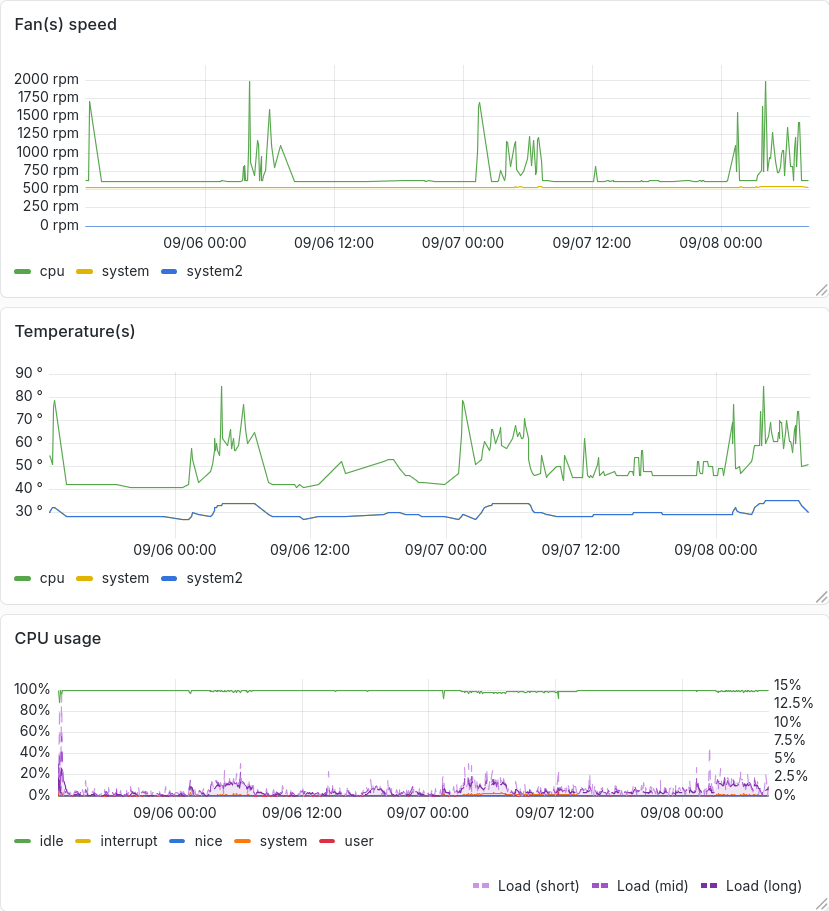
Shut up fans!

The following online resources deal with people who were also bored by
the FAN noise.

Press Del when the AOOSTAR logo appears to enter the BIOS. Then go to
“Advanced / Hardware Monitor”.

BIOS parameter default value posts value my current value
System temperature: +27
CPU temperature: +70
cpu fan Speed: 1800 RPM
system fan Speed: 800 RPM
system fan2 Speed: N/A
CPU Fan: Enabled
Fan Off (0x68): 25 30 degC 25 degC
Fan Start (0x69): 50 60 degC 50 degC
TFull Speed (0x6A): 95
Start PWM (0x6B): 40 30 % 10 %
Automatic Mode Control (0x6C): 2
Delta Temperature (0x6D): 1
System Fan: Enabled
Fan Off (0x70): 20
Fan Start (0x71): 25
TFull Speed (0x72): 85
Start PWM (0x73): 130 10 % 30%
Automatic Mode Control (0x74): 4
Delta Temperature (0x75): 1
System Fan2: Enabled Disabled

Save, reboot and keep an eye on temperatures and fan speed.
With those settings, power usage does not really drop down more. But the
machine becomes way more silent. The (small) CPU fan has a way less
pleasant sound than the (big) rear one. So I went for values that make
the CPU fan run slower unless stress is on the system while the rear
fan runs at inaudible sound.

Just to be sure everything worked as expected (hear, fans do spin when
needed), I wrote a script that would send data to my VictoriaMetrics
database. I couldn’t find any way to access fans speed information using
stock tool. Using superiotool, an ITE IT8613E (id=0x8613, rev=0x8) at 0x2e was found. As I understood, this
post

indicates that a driver was
never imported into FreeBSD. But someone has posted a link to a
dedicated
utility

that can gather this information.

# pkg install -y git gcc
# git clone https://gitlab.com/tingox/it8718fd.git
# cd it8718fd
# make
# ./it8718fd -v -s 1
System 27C
CPU 27C
Northbridge 39C

16 bit fan counters inactive; rpm readings unreliable
CPU 0 rpm
System 739 rpm
Northbridge 530 rpm

Vcore	 0.96
VDDR	 1.81
+3.3	 3.10
+5	 3.76
+12	 5.41
-12	 -9.85
-5	 -1.42
VSB	 3.47
Vbat	 2.34

# make install
# cat > /usr/local/etc/it8718fd.conf
tempin1 = System temperature 2
tempin2 = System temperature
tempin3 = CPU temperature
fan1 = System fan 2
fan2 = CPU fan
fan3 = System fan
^D

# it8718fd -v -s 1
Found an ITE IT8718F (id 0x8613, version 0x08) at special address port 0x2e

System temperature 2 28C
System temperature 28C
CPU temperature 41C

16 bit fan counters inactive; rpm readings unreliable
System fan 2 0 rpm
CPU fan 610 rpm
System fan 531 rpm

I changed the configuration a bit so that sensors were named as they
appear is BIOS. And then used Grafana to keep an eye on those.

Once there, this little machine is pretty what I’ve been waiting for, for
a long time. An extra 1 W is eaten with bhyve virtual machine, which is
not that much.

And that’s all for now folks. See you in EuroBSD
2026

😉


Source: Hacker News

Show HN: Sigabrt.dev – cronjob monitor with an SSH TUI

Your script pings a URL when it finishes. If the ping doesn't arrive on
schedule, sigabrt emails you.

10 heartbeats free. No card required.

Name it, say how often it should report in, and how long you'll forgive it. You get a ping URL.

A curl at the end of your script, after the work succeeds. No agent, no library, no credentials.

Silence means it's fine. You only hear from us when a pulse doesn't arrive.

Add your SSH public key in settings, then connect. Every endpoint’s status,
schedule and recent events in your terminal.

Early days: it only reads for now, and it will change as it grows.
Tell us what you’d want from it.

Unlimited endpoints, unlimited heartbeats, 90 days of history. Start on
the free tier and upgrade when it's carrying something you'd miss.


Source: Hacker News

A custom virtual machine for the Stars 4X game

A custom virtual machine for the Stars! 4X game

Stars! is a 1995 4X game (explore, expand, exploit, exterminate)
for 16-bit Windows 3.1 that I first played ~28 years ago. While Windows is
famously backwards compatible, it’s notoriously difficult to play Stars!
today. Windows x64 cannot run 16-bit applications, and playing requires
either retro hardware or emulation (otvdm, DOSBox), sometimes
paired with Wine. My new, exciting solution, Stars!VM, or
Stars! Virtual Machine, embeds a custom 80286 emulator and a Win16
to Win32 bridge. As native Win32, the game looks and feels exactly as it
did originally, except sporting a modern file chooser and 4k scaling. It’s
indistinguishable from a genuine 32-bit or 64-bit port of the game,
especially with the original 16-bit game embedded inside the VM
executable.

The signed releases on GitHub embed a compressed copy of the original
16-bit game, so that single EXE is ready to play out-of-the-box with no
further setup or downloads. I’m distributing 32-bit builds (but requires
SSE2) because there’s no advantage to 64-bit here, and these builds work
(almost) everywhere except 16-bit Windows. 32-bit Windows could run the
original 16-bit game, but the VM-encapsulated version is better behaved.
It doesn’t dump a Stars.ini under C:WINDOWS, it interacts properly
with the task bar, and copy protection is neutralized via the OS bridge.

If you ever been curious about Stars!, now’s the time to try it. The game
has a thorough, built-in tutorial, but also check out the wiki, the
official strategy guide, and AutoHost (play-by-email service).
The game predates the modern search engine concept, otherwise they might
have chosen a better name. I suggest using “stars 4x” in your searches.

If you want to build from source and hack on the VM yourself, the best
tool for the job is w64devkit, of course, because it comes with
everything you’ll need
. Plus the game itself: stars.exe
from stars27jrc3.zip.

Implementation details

The emulator itself requires x86 or x86-64 because it does not implement
x87 (80-bit floating point) in software, but instead runs these operation
directly on the host’s x87 hardware. This is simple, fast, and precise.
The project validates the emulation as a whole with a differential fuzzer
against the host. The fuzzer randomly generates a 16-bit instruction,
emulates it, then runs it with JIT on the host and compares the
results.

Handles on Windows are pointer-sized, and so the Win16-to-Win32 bridge
maps 16-bit handles to host handles. It marshals between different struct
layouts when translating these calls, services the DOS interrupts the game
requires, an copies data in and out of guest memory. It’s rather like
running a Wasm instance, which of course makes sense in retrospect.

The Win32 bridge is also monitorable and manipulatable using the Model
Context Protocol (MCP). AI agents can “see” the UI “DOM” as it’s built,
and can drive it by injecting synthetic events into the event pump, all
without going through the usual desktop control. The MCP can also read and
write guest memory. Opus 5 played a complete game through MCP — which is
quite fun to watch — requesting my assistance at just two points when it
got stuck in the UI. A foundation for a new Stars!Bench?

Targeting old 16-bit computers, the authors couldn’t afford to build a
sloppy, wasteful UI, and so by modern standards the game UI is remarkably
fast and responsive. They don’t make ‘em like they used to. Computing the
next turn, or “turn generation,” is the computational bottleneck, and so
that’s where I focused my optimization efforts. The emulator can trace
executed instructions, so I gathered traces of turn generation, then had
Fable 5.1 identify and reverse engineer the hottest common routines (e.g.
the game’s L’Ecuyer MCG PRNG) and basic blocks. Each was re-written in C
and mapped into the instruction decoder as new 80286 instructions. On load
the emulator identifies these routines and patches them with the new
instruction. This resulted in a nearly ~2x speedup of turn generation. By
exploiting local conditions, emulating a particular known program, I get
JIT performance without JIT complexity.

The original game doesn’t use buffered I/O, and instead issues many
small reads and writes. Passing these small reads/writes straight to Win32
made I/O take ~5% turn generation time, probably worse today than it was
back then. Plus it’s just rude. The emulator buffers the game’s I/O calls,
further speeding up turn generation.

The game has some sound effects in the “battle VCR” and the final version
of the game shipped with Microsoft’s WaveMix.dll. Rather than load and
link this DLL, the emulator implements the DLL’s interfaces natively, and
these routines are dynamically linked into the 16-bit process. You will
not need this DLL with the emulator, nor is it embedded in releases.

The game also has art assets embedded uncompressed in the original EXE,
forming the bulk of its ~3MB. Stars!VM uses a custom LZ-based compression
algorithm tailored to compressing the original game. It’s compressed when
embedded in releases. So the 32-bit version of the game is half the size
of the original, at ~1.5MB.

The original game requires a serial code, serving as its copy protection.
A code is 8 alpha-numeric characters that must pass two checks. Failing
the first is loud, but failing the second will sabotage your game with
penalties. You’ll know because it will announce that your people suspect
you are a usurper. Most codes you’ll find online are such “usurper” codes.
Play-by-email (PBEM) saves embed a hardware signature derived from C and D
drive configuration. People playing on different machines using the same
serial code recieve the usurper penalty.

I bought a serial code back in the day, but it hasn’t been possible to
purchase one a for at least decade now. So the emulator injects a fixed
serial code on first run (disable with --prompt-serial), and you won’t
need to worry about it. The VM also produces a fixed hardware signature
(same as any other emulator), so it looks like everyone running Stars!VM
is sharing the a machine, meaning no penalty for key reuse. I cracked the
serial code checks anyway, allowing me discover interesting ones. My
favorites: CLONEMUM, CROSSNUT, EGGSWAIN, GHOSTKIN, GONKSHOW, GRIPMIME,
SEEKCAPS, SIFTBOLD, SIRBUOYS, SLIMFAZE, SLOTMOPS, SPAWNELK, SUNBLOND,
WANTNEAR, and WRONGPOX. These look like some of my passwords.

Endless possibilities

I’m quite pleased and excited with the results, especially for a weekend
project. It’s breathed life back into the game for me, not only having a
better experience running it, but also that I can trivially bend the game
to my will in the ways I dreamed about. A few hooks in the right places
should open the game to easy modding, but I’m more engineer than modder.

Have a comment on this article? Start a discussion in my
public inbox
by sending an email to

~skeeto/public-inbox@lists.sr.ht


[mailing list etiquette]
,
or see
existing discussions.


Source: Hacker News

Trying the Software Factory Pattern


Source: Hacker News

The Effect of CRTs on Pixel Art

datagubbe.se »
the effect of crts on pixel art

On Cathode Ray Tubes, nostalgia and anachronisms.

A follow-up to this text is available here.
It goes into much greater detail about signal quality, and also
examines how pixel art techniques have been used on non-CRT
systems.

(Pro tip: All images below are clickable.)

There's a recurring argument made about how modern pixel art often doesn't look right. For example, TikTok user "mylifeisanrpg" has made a popular video in which he explains how pixel artists used to work with the innate physical properties of Cathode Ray Tubes (CRTs). In short, he describes how the fuzziness of a CRT smoothed out the rough edges of low resolution pixels and made things look much less blocky than if viewed on a modern flatscreen display.

This is correct. I also agree that modern, blocky pixel art often is a kind of misdirected, anachronistic nostalgia. However, there's a lot more going on with both pixel art and old gaming hardware than mere CRT fuzziness.

In the above screenshots from mylifeisanrpg's video, we can see an illustration of the "raw" visual data of a Nintendo sprite (to the left) and a rendition of the same image on a CRT screen. I don't know if the CRT version is taken from an actual CRT, but I doubt it – I actually think it looks too fuzzy. I may be wrong – it could be an effect of a close-up photo scaled up – but it's more likely a CRT approximation generated by a software filter on a modern machine. Such software filters are often available in modern software emulating old hardware. While the intention is amicable, I've never seen a filter that can properly convey the peculiarities of a real world CRT. I personally use old CRTs regularly (as in, at least weekly) and when I use an emulator on a modern system, I always disable CRT filters.

2024-08-02: It's been brought to my attention that the above image is indeed a photo of a CRT. Mea culpa! For reference, a less out-of-focus close-up of a CRT will better reveal scanlines, the shadow mask and RGB cells.

2025-10-13: I've written a more in-depth text about the Peach meme and signal quality.

Above is another example, from Twitter user KaelanRamos. It's hard to reproduce the true CRT feeling on anything but an actual CRT: the picture on the right is much too dark and fuzzy to give an accurate sense of what CRTs look like.

Both examples makes it appear as if individual pixels were almost undetectable on CRT screens, which – as will be demonstrated below – simply isn't the case. But while they might be exaggerated, they do illustrate that a certain type of CRT will significantly change the pixel art viewing experience compared to a modern flatscreen.

Like with any artistic medium, CRTs and old hardware have their particular quirks, drawbacks and advantages. On early 8-bit systems, such as the C64 and NES, strict hardware limitations dictated what could be done by way of graphics. The above screenshot is from the Commodore 64 game Maniac Mansion, released in 1987. The original resolution is 160×200 pixels. It would take a tremendously fuzzy CRT to smooth out that kind of blockiness.

Above is a photo of my C64 connected to one of my Commodore 1084S monitors. Despite the poor photo quality, jagged pixel edges are clearly visible, demonstrating that a CRT isn't a catch-all solution for blocky 8-bit graphics.

With time, artists and programmers learned more about these 8-bit systems. Various programming tricks and artistic techniques were developed to produce better quality graphics on the exact same hardware. Below is a screenshot from Mayhem in Monsterland, also on the C64 but released in 1993, six years after Maniac Mansion.

Even on the flatscreen you're most likely reading this on, the graphics above is clearly leagues ahead of Maniac Mansion. Apart from painstakingly utilizing the C64's fixed 16 color palette to construct a coherent game aesthetic, Mayhem in Monsterland makes use of anti-aliasing and dithering to simulate a higher resolution and color depth. (It also uses sprite overlays to achieve this in certain places, which takes some rather finicky programming to get right.) These techniques work with the properties of a CRT – slight fuzziness, scanlines, subtle color bleeding – and against the limitations of the machine – low resolution, limited color selection, very little RAM.

Dithering means using arbitrary pixel patterns such as lines, dots or noise in order to simulate new color values. It's similar to cross-hatching in ink drawings and old engravings.

Anti-aliasing or AA for short, is the concept of using pixels with intermediary color values to smooth sharp edges and simulate a higher resolution.

An example of cross-hatching in an etching by Albrecht Dürer.

Sample dithering and anti-aliasing created in Deluxe Paint II running on MS-DOS.

Because of the extreme hardware limitations of old 8-bit systems, dithering and AA are rare sights when it comes to in-game graphics on such machines. Still images – loading screens – were less constricted than moving graphics and were often more elaborate. Another limiting factor was the development process. While cross-development solutions existed for many platforms, they were expensive and home computer developers often worked on the target machine. Graphics programs for the C64 suffered from the same hardware limitations as games. Mice for the C64 were made, but they were fairly uncommon. Plenty of artists had to use the keyboard or a joystick for drawing.

I'm sure many 8-bit aficionados will disagree, but I think the 16-bit era is the true golden age of pixel art: The Amiga 500, SNES, Atari ST and SEGA Mega Drive. Hardware was still restricted, but the extreme limitations of 8-bit memory addressing were gone. The Amiga could display a 32-color screen and shuffle around huge chunks of graphics without breaking a sweat. Resolutions were still low, though – on average somewhere around 320×240 pixels. Similarly, 32 freely selectable colors from a total of 4,096 was a marvel compared to the fixed 16-color palettes of 8-bit machines, but nowhere close to 24-bit color space we're used to today.

The gradual progression in skill and technical ingenuity that occurred on the 8-bit systems applies to the 16-bit world as well. The rule of thumb, as someone wise once put it, is that "a technology is always at its best right before it's obsolete". Amiga game graphics certainly improved over time, but started at a higher level than the C64. Better hardware meant that conversions of coin-op games – pioneers in lush pixel art – were possible. Silkworm, pictured above in its 1989 Amiga 500 release, may not look quite as stunning as on the original 1988 arcade cabinet, but it's very close. Both anti-aliasing and dithering is used for the in-game graphics.

The title screen from Ruff'n'Tumble above is also taken from the Amiga 500. Released in 1994, it's a fine example of how far pixel art had progressed by then. The palette is constructed using complementary colors, with just a few shades of blue to offset the otherwise red hues and make them "pop". Dithering is prevalent but subtle, and the AA is taken so far that the image looks curiously smooth even on a modern flatscreen. The use of large white highlights, such as in the muzzle fire and on the boy's hair and face, means that a limited number of hues surrounding them will create an illusion of more colors. Furthermore, shadows tend toward an all-black, effectively creating contrast and volume but also allowing the re-use of darker hues for both skin, hair, clothes, fire and the logo text.

So, what role does a CRT play in pixel art? The short answer is "It depends". All CRTs, especially old cheap ones, have artefacts such as visually discernible scanlines (thin black lines between lines of pixels) and color bleeding (an effect of the RGB phosphors and shadow mask or equivalent). These are direct effects of how CRTs work, and both affect how a picture generated by the video hardware is displayed on screen.

Another aspect of old computer displays is signal quality. The best quality on analog displays is always achieved by using separate signals for each color value. This is usually called RGB, after the Red, Green and Blue values making up such a video signal. A lot of old 8- and 16-bit machines were connected to a cheap TV set using either Radio Frequency (RF) modulation or composite video. RF modulation generates a signal usable through the antenna jack on the TV. The result is so poor it might even serve to fuzzify the Maniac Mansion graphics above. Composite is, in comparison, much better. The next step up is S-Video, followed by the king of hooking a computer to a television – RGB separated SCART. The latter was never available in the US of A (an apparently poor and technologically backwards nation), which means Americans will simply have to take my word when I say that RGB SCART on a good TV is nearly as sharp as an actual RGB computer monitor – but just nearly.

Anti-aliasing and dithering does a lot of work when it comes to giving pixel art a smooth appearance. Displaying such techniques on a CRT surely helps – especially those built for PAL or NTSC video. Above is Deluxe Paint IV on Amiga, showing a picture by yours truly on a 1084S monitor. In the zoomed in part of the screen, to the right, AA and dithering is clearly visible. In the normal view to the left, the inherent fuzziness of the CRT blends and smooths both the dithering and AA into something greater than the sum of its parts.

Above we can see a detail from an Atari STe intro called Riverside, by Dead Hackers Society. The edges of the leaves aren't anti-aliased and despite my crappy camera work, pixels are clearly visible when the machine is hooked up to a 14" Philips CRT TV via RGB SCART (on the right hand side of the picture). It would of course be impractical to apply anti-alias here: the swirly water effect behind the leaves constantly changes color, alternating between dark and bright. Applying anti-alias towards a dark color would look extremely grating when the background shifts to bright, and vice versa.

A CRT is indeed much more forgiving than a modern flatscreen, even without anti-aliasing. But in plenty of cases, both dithering and AA were obvious to the end user. Despite this, using them was often a better choice than not: The human brain has a knack for being visually fooled, and a fantastic ability of filling in the gaps.

Dithering and anti-aliasing are both techniques that will improve a pixel art image regardless of what type of screen they're viewed on. They're designed to counteract the low graphics resolution of old hardware – it just so happens that a CRT will make them look even better. Even though a composite signal will make things look fuzzier on a TV set than for example S-Video, the better signal quality is always preferable when dealing with old systems. If there's too much noise, detail will be lost and colors will look off. If available, an RGB connection is always the best choice.

One exception to this rule about signal quality is CGA color blending on old IBM PCs. This uses artefacts of the NTSC composite video signal – not the screen – to display more colors than normally available via the RGB signal on the same system. CGA color blending is described in greater detail on this eminent page, from where I also brazenly stole the illustration above. To the left is the combination of RGB colors and patterns that will produce the NTSC color on the right. This can only be achieved using composite video and has nothing to do with the CRT itself. On a CRT capable of displaying both a composite and RGB signal, the effect will only appear when selecting the composite input.

Note that this CGA trick isn't the same as dithering, even if dithering – when using the right type of screen and colors – can give the illusion of new colors. It's perhaps not as striking as with CGA blending, and can often be identified with a bit of squinting and close examination. This, however, is indeed linked to the use of a proper CRT – as opposed to video signal shenanigans.

So far, we've covered PAL and NTSC displays. These were the first home computer screens available, sometimes in the form of crisp RGB monitors, but more often as an old hand-me-down TV set. They share certain characteristics: a relatively low refresh rate (Just 50 Hz on PAL systems!) and a sparse dot pitch. When it comes to computer screens, there are always two resolutions involved: the one produced by the computer, such as 320×200, and the dot pitch of the screen proper. The dot pitch describes the density of RGB cells on the screen, which determines with what precision the screen can reproduce the desired computer image.

In other words: with better quality components and a better dot pitch, the screen will reproduce the computer image with greater fidelity – reducing the CRT artefacts associated with pixel art trickery. Most old TV sets had a sparse dot pitch. Proper RGB monitors from the same era had a somewhat denser one, and they were in turn surpassed by VGA screens.

Above is a detail from the game Duke Nukem 3D (taken from this video by LGR). It's being displayed on a standard, consumer-grade CRT VGA screen from 1995. The game is running in a low resolution, most likely 320×200. It's a 3D first person shooter, but the status bar at the bottom is still traditional pixel art. Despite heavy use of dithering and anti-aliasing, individual pixels, even with very low contrast, are very clearly discernible. VGA monitors still had the CRT characteristics of their predecessors – they were just of much higher quality and less prone to artefacting. Even so, pixel art techniques were far from pointless – just above the status bar we can see how jagged the hand pushing a new clip into the gun looks without anti-aliasing.

Here's another detail from the same LGR video. It depicts the same monitor, now displaying a 640×480 mode. Individual pixels are still clearly discernible, despite the much higher resolution.

Here's a detail from a monochrome NeXT MegaPixel Display, connected to a NeXT Cube. It's a professional, high quality "paper white" 17 inch screen with an 1120×832 pixel resolution, released in 1990. Despite the high resolution, individual pixels are still visible (which is more evident if you click the image and view it at full resolution).

If you look closely and squint, individual pixels are often discernible even on modern flatscreens. We just don't think about them as much. In part, of course, because they're very small – but also because the image material we typically view has a lot in common with old pixel art trickery: zoom in on a digital photo and you'll see plenty of anti-aliasing. Computers today are also fast enough to apply such pixel art techniques on the fly: font smoothing is just another way to say "real-time anti-aliasing of text".

In fact, the excellent picture quality of late stage CRTs – those made in the late 1990s or early 2000s – will make any old 320×200 pixel art game look basically as crisp and blocky as they do on a modern flatscreen. It wasn't CRT technology itself that made pixel art look better – it was the blatant artefacts of cheap, low dot pitch PAL and NTSC consumer electronics that coincided to create just the right amount of fuzz. Considering this, plenty of properly credentialed retro gamers may have different memories of what pixel art "should" look like depending on whether they were DOS (VGA), Amiga (RGB) or 8-bit console (composite) aficionados.

If exploring old, authentic pixel art using a modern screen, you'll eventually come across something like this:

Governor Elaine Marley (from the legendary LucasArts point-and-click adventure Monkey Island) looks all squashed, despite her 256 color VGA glory!

This is an artefact of 1:1 conversion of old pixel art. Modern flatscreens all have fixed resolutions and purely digital interfaces, ensuring a fixed aspect (width-to-height) ratio and completely square pixels.

CRTs, on the other hand, can display a number of various resolutions. VGA, for example, includes the gaming standard 320×200 pixels in 256 colors and the business-oriented 640×480 in 16 colors. These two resolutions have very different aspect ratios. A VGA monitor still had to be able to display both of them, thus approximating the aspect ratio of 640×480 rather than that of 320×200. Hence, if you wanted the abundance of 320×200 games available to fill the entire height of your screen, you had to adjust it so that the pixels weren't square.

If we increase the height of the above image just a little bit, so that it better matches a 640×480 aspect ratio, we end up with this:

Ahh, that's a lot better. Variable aspect ratios and resolutions with non-square pixels is an oft-forgotten quirk of CRT screens. It was also never taken into account when porting PC games to PAL Amigas running a 320×256 resolution. This means I grew up with the oblong version of Governor Marley, forever affecting my preference in women.

When it comes to pixel art, I'm something of a purist. I've grown up with 16-bit systems and still use them actively in the context of the demo scene. I even dabble in pixel art myself. Plenty of pixel art is still produced for and on old platforms, most of it much better than my own attempts. These works all follow the core tenets of what I consider pixel art:

Taking some artistic liberties with resolution and color palettes in a modern "pixel art" game is fine by me. My main gripe is with sloppy technique. A lot – not all, but a lot – of modern pixel art is purposely made to look overly blocky. Dithering and anti-aliasing just isn't utilized, which makes it look even chunkier than actual old game art does on a modern screen. It seems to me as if the artists are worried that classic pixel art techniques would make things look too good, though I personally believe the opposite applies.

CRTs played a large role in the pixel art experience of yesteryear – especially cheap TV sets and consumer-level RGB monitors intended for PAL or NTSC signals. Equally important, however, were techniques such as palette selection, dithering, anti-aliasing and color blending. Pure programming trickery also helped produce better quality pixel art, especially on 8-bit systems.

Modern pixel art suffers from two ailments: artists afraid of using traditional techniques because things may not look blocky enough, and rosy nostalgia that unfairly depicts CRT screens as a much more forgiving medium than they actually were.


Source: Hacker News

So I have a weatherman, which also tells me the news

Photo of the finished weatherman: a LILYGO T5 e-paper display on a breadboard showing weather, to-do, markets, air quality, and Hacker News panels, with a DHT22 sensor wired in next to it

The summers in my region are quite dry, hot & rather unbearable. So, to get some refuge from all of this, I wanted to try out a few different measures, which would effectively reduce the temperature of my house. I thought a good starting point for this would be to establish a baseline and find out the standard deviation. To do this, I realized I’d need to observe the temperature & humidity of my house for a certain duration.

Grafana panel showing a week of indoor temperature readings (min 26.1°C, max 29.4°C, average 27.8°C) with a time-series chart, and the start of the humidity stats below

At the same time I’ve been trying to reduce the amount of content recommended to me by algorithms on social media, especially YouTube, Instagram & Reddit. Hacker News, with its rather transparent algorithm and RSS feeds of the authors I like seemed like a good start to take control of the content I consume, which is why I had set up miniflux, and it’s been going well. It’s just that I tend to miss some of the cutting edge stuff which appears regularly on HN. Especially with the AI/LLM stuff.

Miniflux feed list showing 22 subscribed feeds with unread counts, including Hacker News: Active, Hacker News: Best, Simon Willison's Weblog, LWN.net, and The Cloudflare Blog

Also, I am interested in astronomical events like occultation of certain stars & planets by the moon or eclipses, etc., so that I can decide whether I can try to observe those with my telescope. Which is also related to my interest in knowing the air quality around my house.

While I was thinking this, I realized that I had an e-paper display that’s sitting in the electronics basket at the corner of my room, collecting dust. One fine day, I decided to use Claude Code to finally build something for it, and use it as a static display which serves things I mentioned above.

I had bought it from hubtronics.in a couple of years back, when I was working on a project which involved embedded programming on STM32/MC60. It’s the T5 e-Paper module from LILYGO. It has an ESP32 chip integrated, which supports WiFi & Bluetooth.

Component LILYGO T5 4.7″ e-Paper
SoC ESP32, dual-core Xtensa LX6 @ 240 MHz
Wireless Wi-Fi 2.4 GHz (802.11 b/g/n), Bluetooth 4.2 + BLE
Memory 520 KB SRAM · 8 MB PSRAM · 16 MB flash
Display 4.7″ e-Paper · 960 × 540 · 16-level grayscale (ED047TC1)
Extras USB-C, Li-Po connector, RTC, ~170 µA sleep current

User Interface

So, next question was how do I project this data on the display. The structure, form of the content, and what pieces of it need to grab my attention the most.

First Attempt

I started way too unstructured, and was caught off guard quickly. I hadn’t given any attention to the layout, and ended up printing everything as a single left aligned blob of text.

It was quite ugly, and I didn’t even click a picture of it.

A recreation of the early single-paragraph layout, before any grid or hierarchy was applied

Second Attempt

I decided to start with a simple design. It consisted of an HTTP server, which would collect all the feeds from external APIs, and serve it over HTTP as a JSON. This JSON, with a fixed schema/contract would be rendered by ESP32. ESP32 will periodically refresh the screen, after a successful API call to the server.

Then I prompted Claude to come up with a grid of 2×3 (height x width) and it quickly came up with a good enough render.

I then prompted it to do the attention grabbing bits where the most relevant pieces of information were made to appear bigger, concise and easy to grab attention.

Top row would show the weather, todo and AQI + stats. Bottom row would show HN, reading and date/time.

This worked well, except that the 320px cell for HN was too cramped for the headlines. Also, the date-time & reading were too thin to justify a full cell. So, I decided to merge the bottom-right two cells to create a double-wide HN zone. I also consolidated ToDo + Reading into one top-center cell. Markets would be at top-right, AQI + moon at left bottom. Date-time & Sunrise sunset would be at the bottom of the wide HN zone. I had to also fiddle around fonts, I started with OpenSans, and later moved to Montserrat, with different sizes for fit. I also moved away from image assets to all primitives, also added a few idioms, where titles would be uppercase & underlined.

Network Architecture

While I was iterating on the UI, I had flashed a static JSON with the ESP32 firmware, which was used to render the UI. I now had to wire the ESP32, over wifi/bluetooth so that it can fetch data wirelessly from the server.

I was quickly able to ship firmware, with a http url consisting of the internal IP address of the server. I asked Claude to implement a server in Clojure which served a static JSON.

System architecture: the ESP32 display fetches a JSON feed from the HTTP server, which aggregates weather/AQI, Hacker News and market data

I then decided to experiment around mDNS, tried the ESPmDNS for resolution. I couldn’t get it to work at all, even after iterating a couple of times using Claude to debug why the ESP is unable to resolve the mDNS hostname. Eventually, I gave up — things were still working fine at this point, and ESP32 could fetch and render a JSON from the server.

There were a few issues though.

  • When I configured ESP32 to sleep after the rendering is done, and wake up after 10 mins to fetch the updated feed, it just wouldn’t wake up.
  • If there was a fetch failure at the server, it would stop serving stuff, instead of serving last good value.

Also, I wanted to introduce a few more features:

  • Indoor air quality using a sensor
  • Integrating the TODO/Reading lists
  • Change detection to skip e-paper refresh if data hasn’t changed.

I’ll cover these in the upcoming blog posts.

This is how the display looks:

The finished dashboard rendered on the LILYGO T5 e-paper display

Thanks for reading!


Source: Hacker News